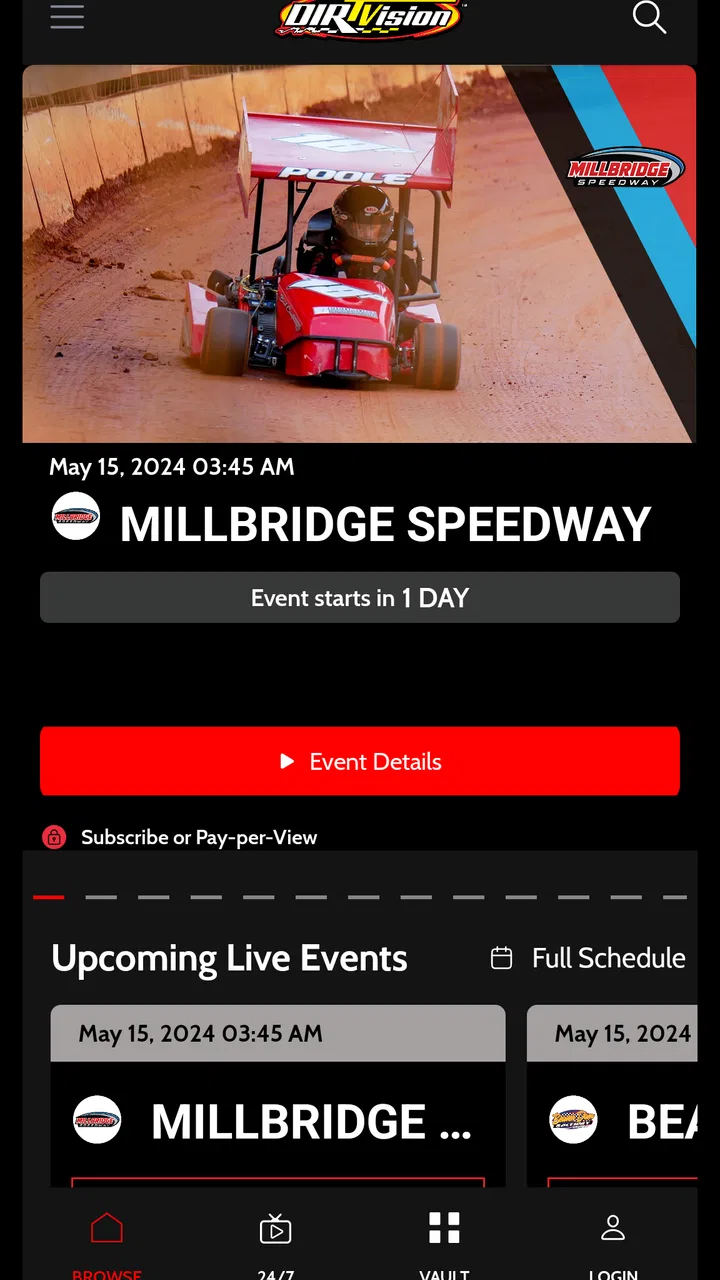
DIRTVision
- 4.5
- Rating
- 100.00K
- Installs
- Free
- Price

 Analysis by App-foxy
I found DIRTVision most useful when I treated it as a shared viewing tool rather than just another sports app. If one person in the household follows dirt racing closely while everyone else only watches occasionally, it gives that fan a direct place to follow the action without turning the television schedule into a family negotiation. The app comes from World Racing Group and sits firmly in the Sports category, with a free download and an Everyone content rating.
That basic arrangement sounds simple, but it affects whether the app earns a place on your phone. I would recommend it to someone who wants access to live dirt-racing coverage while away from a television, or who wants to keep an event available while another person is using the main screen. I would not recommend installing it just because you enjoy mainstream sports in general. Its value depends on whether dirt racing is already part of your viewing habits.
How DIRTVision fits into a shared household
My realistic use case is a busy evening at home: one person is watching a film, another is following a race, and a third wants to keep up with the event without asking for the remote. On a phone or tablet, DIRTVision can fill that gap. The screen is personal, the viewing choice is separate, and the app’s purpose is clear enough that it does not need to compete with a broad entertainment service.
You May Also Like

 Blood Strike: 2.5 Anniversary
Blood Strike’s Loadouts Turn Every Drop Into a Tactical Gamble
A close look at Blood Strike’s custom loadouts: how fast access to signature weapons reshapes its battle royale rhythm, rewards preparation, and narrows the gap between fights.

 Pandora - Music & Podcasts
Pandora’s Music Is Easy to Start, but Harder to Recover
Pandora’s strength is its low-effort path from a seed to a station. Its weak spot is how much confidence it asks you to place in connection, setup, and quiet recovery.

 8 Ball Pool
8 Ball Pool Is Built on Rivalries, Rematches, and Routine
A close look at the rivalries, rematches, shared routines, and unanswered safety questions that turn a quick pool match into a persistent mobile community.

 Samsung Music
Samsung Music’s Quiet Strength Is Playing What You Already Own
Its reach comes less from spectacle than from dependable access to a personal library. That simplicity is both the app’s strongest retention engine and its ceiling.

 AccuWeather: Weather Radar
AccuWeather Review: A Quick, Clear Forecast for Everyday Decisions
For everyday plans, the best forecast is the one you can understand quickly. AccuWeather makes rain timing, radar, and local conditions easy to act on, with a few trade-offs.

 Hill Climb Racing
Why Hill Climb Racing Still Turns Crashes Into One More Run
A tiny car, a bumpy hill and one more upgrade: Hill Climb Racing keeps resurfacing because its simple chaos makes every near-miss feel personal.
More From Our News Desk



That does not mean it replaces a large television. Racing is easier to appreciate on a bigger display, especially when the field is spread across the track or the action becomes difficult to read on a small screen. I see the mobile app as a flexible second screen: useful in the kitchen, on a break, during travel, or when the household television is already occupied. The phrase “watch live anywhere, anytime” is most convincing in those practical moments, not as a promise that a phone is always the best viewing setup.
For shared-device homes, the first question is who will use the app and when. If several people take turns using the same tablet, I would avoid leaving it open on an unattended viewing session. That is ordinary good housekeeping rather than a special DIRTVision feature. Close the app when finished, keep the device available for the next person, and make sure the person who starts a viewing session understands that it is a sports service rather than a general video library.
The app’s free entry point also makes it easy to try without committing immediately. However, free installation should not be confused with unlimited free access to every part of the experience. DIRTVision includes in-app purchases ranging from $4.99 to $299.99 per item, so I would discuss purchases before handing the device to a child or a guest. The wide range matters more in a shared household than it does on a personal phone because another user may not understand which viewing choice carries a charge.
What the first setup should establish
I would begin by deciding whether DIRTVision belongs to one person’s account or is intended for occasional use by several household members. That boundary is important because sports viewing can quickly become tied to personal preferences, saved access and payment decisions. Even without inventing account features, the sensible approach is clear: the person responsible for purchases should handle the initial setup and remain aware of who is using the device.
On a personal phone, this is straightforward. On a family tablet, it deserves more attention. A child might be allowed to watch an event but not make a purchase. A partner might want to use the app independently but prefer not to alter the primary viewer’s arrangements. Since the app is rated Everyone, its subject matter is broadly suitable for general audiences, yet an age rating does not settle questions about spending, screen time or household rules.
I also recommend checking the device before an important event. Make sure the app is installed on the device you actually plan to carry, the battery is adequate, and the connection is dependable. Live sports are less forgiving than on-demand video: if the connection is poor at the start, you may miss the opening moments while sorting things out. This is one of the less obvious trade-offs of mobile viewing. Convenience comes from being untethered, but reliability depends more on the place and device than it would with a traditional television setup.
Another useful habit is to choose the viewing device according to the situation rather than automatically using the newest phone. A tablet is better for two people sitting together, while a phone is more discreet when you are away from the living room. If the household shares one device, agree on who has priority during a live event. That small conversation prevents the app from becoming a source of conflict, especially when a race overlaps with another person’s planned use of the tablet.
Coordinating live viewing without taking over the home
Live racing creates a different kind of coordination problem from ordinary video. You cannot always pause the event for the next person, and joining late can make it harder to understand what is happening. I would therefore treat DIRTVision as a scheduled activity when the event matters, even if the app itself is available at any time. Tell the household when you intend to watch, choose headphones if the sound would disturb others, and reserve the larger screen only when everyone agrees.
This approach works particularly well for a household with one dedicated fan and several casual viewers. The fan can follow the live action on a personal device, while the rest of the family keeps its own plans. If someone becomes interested, they can watch alongside the fan rather than having the entire evening reorganized around the race. In my experience, that is where a focused sports app has an advantage over opening a general streaming service and searching through a crowded catalog.
There is also a coordination benefit when people are in different places. A viewer can follow an event while traveling or during a break instead of waiting until returning home. That is valuable for fans who do not want to rely entirely on television availability. At the same time, I would not assume that mobile access removes every practical limitation. Your experience still depends on the device, connection and surroundings, and a noisy or crowded place may make live commentary difficult to enjoy.
For shared viewing, headphones are often the most considerate choice, but they introduce a small safety and awareness issue. Someone wearing them may not notice a conversation, a doorbell or another household need. I would use them when concentration is helpful, then remove them when the app is running in the background of family life. That sounds minor, but it is the difference between fitting sports into a home and allowing sports to dominate it.
A second non-obvious tip is to avoid making the app the only plan for a major event if the occasion matters to several people. Keep the household’s viewing expectation realistic: if everyone wants to watch together, use the most comfortable available screen; if only one person cares, use DIRTVision privately. The app is strongest when it solves a specific access problem, not when it is forced to serve every viewing style at once.
Age, trust and responsible access
The Everyone rating makes DIRTVision approachable for a broad audience, but parents should still separate content suitability from account responsibility. A young viewer may be perfectly comfortable watching sports while still needing an adult to manage purchases and device use. I would explain that the app is free to install, then make the payment boundary clear before letting a child explore it.
The same principle applies to guests. If a friend uses your tablet during a race, show them what they are allowed to open and whether purchases are off limits. Do not assume that a large purchase range will be obvious to someone unfamiliar with the account. A shared device should have a shared understanding, even when the app itself is easy to navigate.
Trust also matters between adults. If one person pays for access or treats the app as a personal sports subscription, the others should know whether they are welcome to use it. I would not hand the device around during a live session without explaining whose account is active. This avoids accidental changes and keeps personal viewing habits separate from household browsing.
For children, I would focus on three simple rules: ask before installing anything else, ask before making any purchase, and stop watching when the agreed screen-time period ends. DIRTVision’s sports focus can make it feel more structured than an endless entertainment feed, but a live event can still run longer than expected. A parent may need to decide in advance whether the child can watch the full event or only part of it.
There is a useful distinction here between letting a child watch with an adult and letting a child manage the app alone. The first can be a shared sports experience; the second involves account and spending responsibility. The Everyone label supports the former, but it should not be treated as automatic permission for the latter. I appreciate the broad age suitability, yet household trust still has to be managed by the people who own the device and account.
What the app does well for dedicated dirt-racing fans
DIRTVision’s biggest strength is focus. Instead of asking a dirt-racing fan to search across unrelated sports services, it puts the relevant viewing purpose in one place. The store summary presents it as a way to watch live coverage, and that narrow identity is exactly why it can be more useful than a general sports app for the right person.
I also like the way its mobile format matches the habits of fans who do not stay in one room. A person can follow the action while moving around the home, waiting somewhere, or using a secondary device. That flexibility is more meaningful than simply saying the app is portable. It changes how a household can share time: the fan does not have to demand the television, and the rest of the family does not have to pretend to care about the race.
The app’s audience appears engaged as well. It has a 4.5 average from around 2.3 thousand ratings, with more than 100 thousand installs. Those figures do not guarantee that every device or household will have the same experience, but they do suggest that DIRTVision has found a real audience rather than existing only as a rarely used companion app.
The developer, World Racing Group, gives the product a clear connection to the racing world it serves. That matters because a focused app needs a focused reason to exist. I would rather use a specialized service when I know exactly what I want to watch than browse a broad platform hoping to find the right event at the right time.
Where the usual alternatives may be better
If you mainly watch football, basketball, tennis or a mixture of unrelated sports, a broader sports platform may be the better choice. It can reduce the number of apps on your device and give the household more variety. DIRTVision is not a universal sports hub, and its specialization becomes a limitation when your interests are scattered.
A traditional television setup may also be preferable for a planned family viewing session. A larger screen, shared sound and a comfortable seating arrangement create a better group experience than passing around a phone. DIRTVision’s advantage is independence and portability, not necessarily the biggest or most social presentation.
On-demand video services are another alternative when convenience matters more than live access. If you prefer to watch whenever everyone is available, a service built around replay and flexible scheduling may fit your household better. Live sports have urgency, but that urgency can become pressure when work, school, meals and bedtime do not line up with the event.
There is a financial trade-off too. The app itself is free to download, yet its in-app purchase range reaches from $4.99 to $299.99 per item. I would compare the cost of the specific access you want with the value you expect to get from following dirt racing regularly. For a committed fan, direct access may feel worthwhile; for someone who watches only once in a while, a broader service or occasional television coverage could be more sensible.
One practical decision rule helped me: install DIRTVision when the question is “How can I reliably follow dirt racing away from the main screen?” Choose something else when the question is “How can my household watch many different sports and shows from one place?” That distinction prevents disappointment and keeps the app’s role clear.
Small habits that improve the experience
Use the app with a viewing plan. Before starting, decide whether you are watching attentively or simply keeping up while doing something else. For attentive viewing, use the largest comfortable screen and a stable connection. For background following, a phone is enough, but do not expect the same sense of detail or immersion.
Keep purchases deliberate. Because the app includes items across a very broad price range, I would never let a child or unfamiliar guest explore freely on a device connected to the household payment method. Make the purchase decision before the event begins, not in a hurry when the live coverage is already underway.
For a shared tablet, return it to a neutral state after watching. Close the app, lower the volume, and leave the device charged if another person may need it. This is a simple workflow, but it makes specialized sports apps much easier to live with in a family setting. The fan gets the event, and the next user does not inherit a loud screen or an unfinished session.
If two people want to watch, decide whether they are actually sharing the experience or merely using the same account at different times. Watching together is a social activity; taking turns is a scheduling arrangement. Mixing those expectations can lead to arguments about who controls the device or whether someone can interrupt the event.
I would also avoid judging the app after a single rushed session in an inconvenient location. Mobile sports viewing is sensitive to context. Try it in the place where you expect to use it most, with the device and headphones you normally carry. That gives you a more honest sense of whether the portability is genuinely useful or merely attractive in theory.
My household verdict
I see DIRTVision as a strong specialist app for a household that includes a genuine dirt-racing fan. Its free installation, Everyone rating and focused sports purpose make it approachable, while live mobile viewing gives one person more freedom without automatically claiming the family television. The app is especially convincing as a second-screen solution for busy homes.
My recommendation comes with clear boundaries. Decide who controls purchases, explain how the shared device should be used, and choose the screen according to whether the event is personal or social. The app can support household harmony, but it cannot create that coordination by itself. A little planning matters more here than another feature or a larger catalog.
I would skip it if you want a general sports package, mostly prefer recorded viewing, or have no real interest in dirt racing. A broader service may offer better variety, and a traditional television may offer a better group experience. But if your main goal is to keep up with live dirt-racing coverage wherever you are, DIRTVision is a focused and practical choice rather than a generic sports download.
After using it as a personal and shared-device option, I would recommend trying it with a specific viewing situation in mind. Install it for the race you genuinely want to follow, set the household rules before anyone else uses the device, and judge its value by how naturally it fits your routine. For the right fan, that focused approach is exactly what makes the app worth keeping.
FAQs for DIRTVision
01What is DIRTVision?
DIRTVision is a streaming platform focused on dirt-track racing and other motorsports content. After installing the app, users can browse live events, race replays, highlights, interviews, and related video programming. It is designed for fans who want to follow racing series and drivers beyond traditional television coverage, with content availability depending on the event and region.
02Is DIRTVision free to use?
DIRTVision can usually be downloaded at no cost, but much of its premium racing content may require a subscription, event purchase, or another form of paid access. Some videos, news, and promotional material may be available for free. Before subscribing, check the current pricing, included competitions, billing terms, and whether the selected package renews automatically.
03What sports and racing events are available on DIRTVision?
DIRTVision primarily focuses on dirt-track motorsports, including live races and coverage from participating racing series, tracks, and events. The exact catalog can change throughout the season because broadcasting rights and schedules vary. Users should review the in-app schedule or official event listings to confirm that their preferred series or race is included in their location.
04Can I watch DIRTVision on a television or other devices?
DIRTVision is intended for use on mobile devices, but supported viewing options may also include web browsers, smart televisions, streaming media players, or casting features, depending on the current platform support. Compatibility can differ between Android, iOS, and connected-TV systems. Check the official device list before downloading if television viewing is especially important to you.
05Does DIRTVision support offline viewing or work without an internet connection?
DIRTVision is mainly a streaming service, so a stable internet connection is generally required for live races and on-demand video. Offline downloads may not be available for every program, event, or subscription type. For the best experience, use a reliable Wi-Fi or mobile-data connection, especially during live broadcasts, and verify data usage if you plan to watch over cellular networks.
Pros
- Live coverage of major dirt racing events and series
- Replay races and catch up on missed sessions anytime
- Race schedules and event information are easy to find
- Supports casting to compatible TVs for a larger viewing experience
- Regular updates keep new racing content available
Cons
- Some premium races require a separate subscription or purchase
- Video quality may depend heavily on your internet connection
- Older devices can experience lag during live broadcasts
- The content is focused mainly on dirt racing fans
- Some replays may have regional viewing restrictions

DIRTVision
Gallery